

Connect your Power BI semantic model to Claude for dashboards and slides
Claude can create dashboards and slides based on your Power BI data. With Microsoft's Power BI MCP server, Claude retrieves that data directly from your semantic model, under your own account. In this article, you'll read what your administrator needs to set up in the tenant and how to add the connector in Claude.

Claude is good at creating dashboards and presentations. You describe what you want to see and Claude builds an interactive page or a set of slides. But where do the figures come from? Often from an export: you pull a CSV from Power BI, upload it to Claude and hope the data is still correct when you present the slides.
There is a better way. With Microsoft's Power BI MCP server, Claude reads directly from your semantic model.
The problem with exports
An export is a snapshot. After the model refreshes, your dashboard is out of date. On top of that, the logic of your model is not in a CSV: Claude then has to guess the measures, relationships and definitions. Before you know it, you have a revenue figure that differs slightly from the one in your Power BI report.
The solution: the Power BI MCP server
MCP (Model Context Protocol) is an open standard that lets AI assistants use data and functions from other systems. Microsoft offers an MCP server for Power BI, currently in preview. With it, Claude can:
- Read the schema of a semantic model: tables, columns, measures and relationships
- Look at the structure of a report, so Claude sees how the model is used in practice
- Write a DAX query and run it against the model
So you ask a question or ask for a dashboard, and Claude works out which measures and columns it needs. The figures come from the same model as your Power BI reports, with the same definitions.
What does your administrator need to set up?
Before you can use the connection, two things need to be done in your tenant. For this you need a Power BI administrator and someone with permissions in Microsoft Entra ID.
1. The tenant setting in Power BI
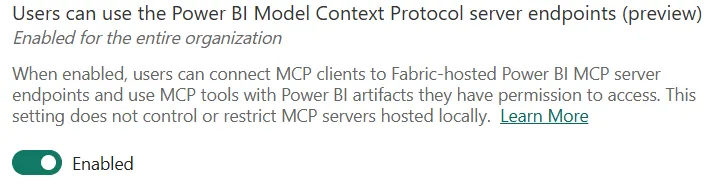
In the Power BI admin portal, under Tenant settings, in Integration settings, you will find the setting Users can use the Power BI Model Context Protocol server endpoints (preview). In the Dutch portal it is called Gebruikers kunnen de servereindpunten van het Power BI Model Context Protocol gebruiken (preview). It is off by default. Turn it on for the entire organization or for a security group with the people who will be using it.
2. An app registration in Microsoft Entra ID
Claude has to sign in to Microsoft with an OAuth client. Entra ID does not support Claude registering itself, so you create your own app registration:
- Name: for example Power BI MCP - Claude
- Supported account types: accounts in your own organization only (single tenant)
- Redirect URI: platform Mobile and desktop applications, with the address
https://claude.ai/api/mcp/auth_callback - API permissions: for Power BI Service, the delegated permissions
Dataset.Read.All,Workspace.Read.AllandMLModel.Execute.All - Admin consent: grant it if your tenant requires it; otherwise Claude asks for your consent the first time you sign in
After you create it, the overview page shows the Application (client) ID. You need it in Claude.
Microsoft describes these steps in the guide Register Power BI MCP servers for MCP clients.
How to add the connector in Claude
Is the tenant set up? Then you can turn on the connection in a few minutes:
- In Claude, go to Settings > Connectors > Add custom connector.
- Enter Power BI as the name and
https://api.fabric.microsoft.com/v1/mcp/powerbias the URL. - For the OAuth client, choose your own client and enter the Application (client) ID of the app registration. A client secret is not needed.
- Click Add, sign in with your work account and consent to the requested Power BI permissions.
Then test it with a simple question, such as: "Which tables are in semantic model [ID of the model]?" You can find the ID of a model in the Power BI address bar, after /datasets/.
What can you do with it?
From now on, you work in Claude directly with the data from your models. A few examples:
- A dashboard as an artifact. Ask Claude for an overview of revenue per month and per region. Claude builds an interactive page from it that retrieves the figures from the model itself.
- Slides for a meeting. Ask for a short presentation with the main developments of the past quarter. The charts in the slides are based on the latest figures from the model.
- Quick questions. How many new customers did we have in September? Which five products grew the fastest? Claude writes the DAX and gives the answer.
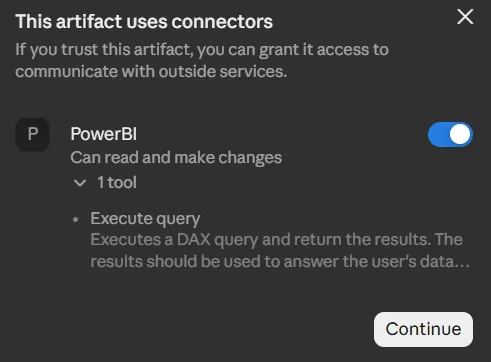
An artifact can also use the Power BI connector itself. When you open the dashboard, Claude asks whether the artifact may use the connector. Once you allow it, the dashboard runs DAX queries against the model itself and you see the latest figures. There is nothing to export again.
Secure, because it runs under your own account
The connection uses delegated permissions. Claude runs the queries on your behalf, with your permissions in Power BI:
- You only see data you already have access to in Power BI. Row-level security still applies.
- You need at least Build permission on the semantic model.
- The MCP server we use here is read-only. Claude cannot change your models.
Good to know
Also keep the following in mind:
- The Power BI MCP server is in preview. Microsoft may still change how it works or which permissions it needs.
- The server also has a function that generates DAX with Copilot in Power BI. It requires a Copilot license and consumes capacity. Claude can also write the DAX itself, so you can turn off that function in Claude.
- The better your model is prepared, the better the answers. Clear names, descriptions on measures and the AI settings in Power BI help Claude choose the right fields.
Need help?
Referit builds data warehouses and Power BI solutions and helps organizations use AI securely on their own data. Want to know how to prepare your models for AI, or are you stuck with the setup? Feel free to contact us.