
The misconception about the origins of cyber attacks and the consequences
Your company data is out in the open due to a data breach, you've lost control of systems and a huge ransom is demanded. These are the earnings of hackers and, unfortunately, you hear it more and more often. That doesn't mean it has to happen to you. In fact, there is a misconception about the origin of these cyber attacks and once you are aware of it, you can protect yourself and your business from it.
a cyber attack lurks in a small corner.
As a provider of IT services, we like to help raise awareness about Cyber Security. Companies usually turn to our help when it is actually already too late. They can't access data, for example, and suppliers and customers may even be locked out as well. It only takes something small to happen or a major data breach occurs. A data breach affects consumers and businesses. But how does this impact your business and what are the consequences?
various cyber attacks.
The main goal of hackers, of course, is to make money. What is most common is for data to get into the hands of hackers and be resold to criminals. Also, money can be made directly when bank accounts are accessed. A cyber attack can target individuals or (large) companies. But nowadays there are also cyber attacks carried out by other countries with the aim of obtaining political information. Here you can find more information about cyber security in the Netherlands.
Colleagues within Referit have sometimes received a phone call from "Microsoft" asking for account information.
phishing.
Phishing emails are the biggest problem. Emails that appear to come from often trusted entities, but contain a curious file or link. A file often contains malware that unleashes ransomware. A a link can lead to a copy of a certain website. This attempts to fool you into providing sensitive information such as personal and banking information.
But phishing also occurs via phone and text messaging. Colleagues within Referit have sometimes received a phone call from "Microsoft" asking for account information. Obviously, this is not a Microsoft employee, but a fraudster.
What can you do about this yourself? Here are some examples, you will receive one:
• Emails from package delivery services such as DPD. “Am I expecting a package?”
• Emails from the bank. “Ismy bankasking forpersonal information via email?”
• Emails asking you to verify your login credentials. “Did I just create an account?”
• Video or link via social media. “Do I know this person, and does this make sense?”
Phishing can happen to anyone. Besides the security of personal property, you also have to deal with the security of your phone, tablet or laptop that may have company applications on it. Thus, through you, the company can also bear the brunt.
hacking.
Whereas with phishing you end up leaving personal data somewhere yourself, with hacking your system or network is invaded. For example, it has happened before that iCloud accounts of Apple users were hacked, after which photos ended up on the Internet. This can happen to any user. Once a hacker has gained access to one of your accounts and you happen to use this password for multiple accounts, you probably know what time it is.
What many people don't know is that there is such a thing as two factor authentication (2FA). This is login method where you use not one, but two keys. In addition to your password, you can, for example, have an additional notification set up, a code generated on your phone or facial recognition set up. So in 99% of cases, the above can be prevented.
ransomware.
One form of cyber attack that is gaining ground is ransomware. Literally translated, ransom means ransom. So it is a malware that somehow invades a computer or network, blocks data through a script and then asks for a ransom in exchange for unblocking. You usually find out about it when you start your computer and see a screen with this message.
Unfortunately, paying the ransom does not always have the desired result. Data is initially accessible again, but the virus is found to still be on the computer. Some time later, the data can be fixed again and even more money is demanded. Read here what to do if your business is infected with ransomware.
Ransomware comes from outside, but the threat often originates inside the network.
Arnaud van Herk - Referit
misconception about the origins of cyberattacks.
A common misconception about cyberattacks is that companies often believe, for example, that ransomware enters through the firewall. Our cybersecurity expert Arnaud van Herk explains: “Ransomware comes from outside, but the threat often originates within the network.” This means that the company’s own employees unknowingly pose the greatest danger.
For example: an employee has received an email or brought a USB drive from home. The email or USB drive contains a ransomware virus, which is opened. At that moment, nothing usually happens. Often, the virus “lies dormant” and becomes active after, say, two weeks. This makes it very difficult to determine exactly when the virus entered the system.
The threat often originates from within, when a script in a phishing email or on a USB drive releases a ransomware virus. Ransomware is inextricably linked to phishing. Check out the “latest ransomware statistics and trends in 2023” here .
major consequences.
A cyber attack can have several major consequences, including:
• Stolen account information;
• Identity theft due to personal information being publicly available;
• Direct financial losses or ransom demands.
In addition, it is critical that a virus be found and removed as quickly as possible. A specialized party in cyber security will need to be hired for this purpose.
protection against cyberattacks.
We implement the following solutions not only for the systems we host for clients, but also for our own networks and systems. Most of the solutions below are aimed at preventing cyber attacks.
• Endpoint protection: We implement Mobile Device Management (MDM), primarily for customers to whom we provide our CSP services, but also for our own employees. We use Microsoft Endpoint Manager to facilitate MDM, allowing us to install, manage, and secure devices.
• Encryption of data storage devices (hard drives, USB drives): We encrypt certain data streams. For example, we do this with the hard drives of our laptops. This ensures that your hard drive only works in your laptop.
• Authorization: We apply the “least privilege principle” for our customers. Employees have only the permissions they need. This allows you to see exactly who has access to what.
• System access: We provide accessto our systems for both our administrators and our customers via Site-to-Site VPN tunnels. Systems accessible directly via the internet can only be accessed using MFA.
• Immutable data backup: We ensure that copies of all our customers’ data are always created. We also implement data encryption and make immutable backups at an off-site location managed by an independent third party. We use Wasabi for this purpose. This means that even ransomware or hackers cannot gain access to this data. Unfortunately, we still often see companies that do make backups but fail to implement data encryption and immutable backups. As a result, ransomware can still strike.
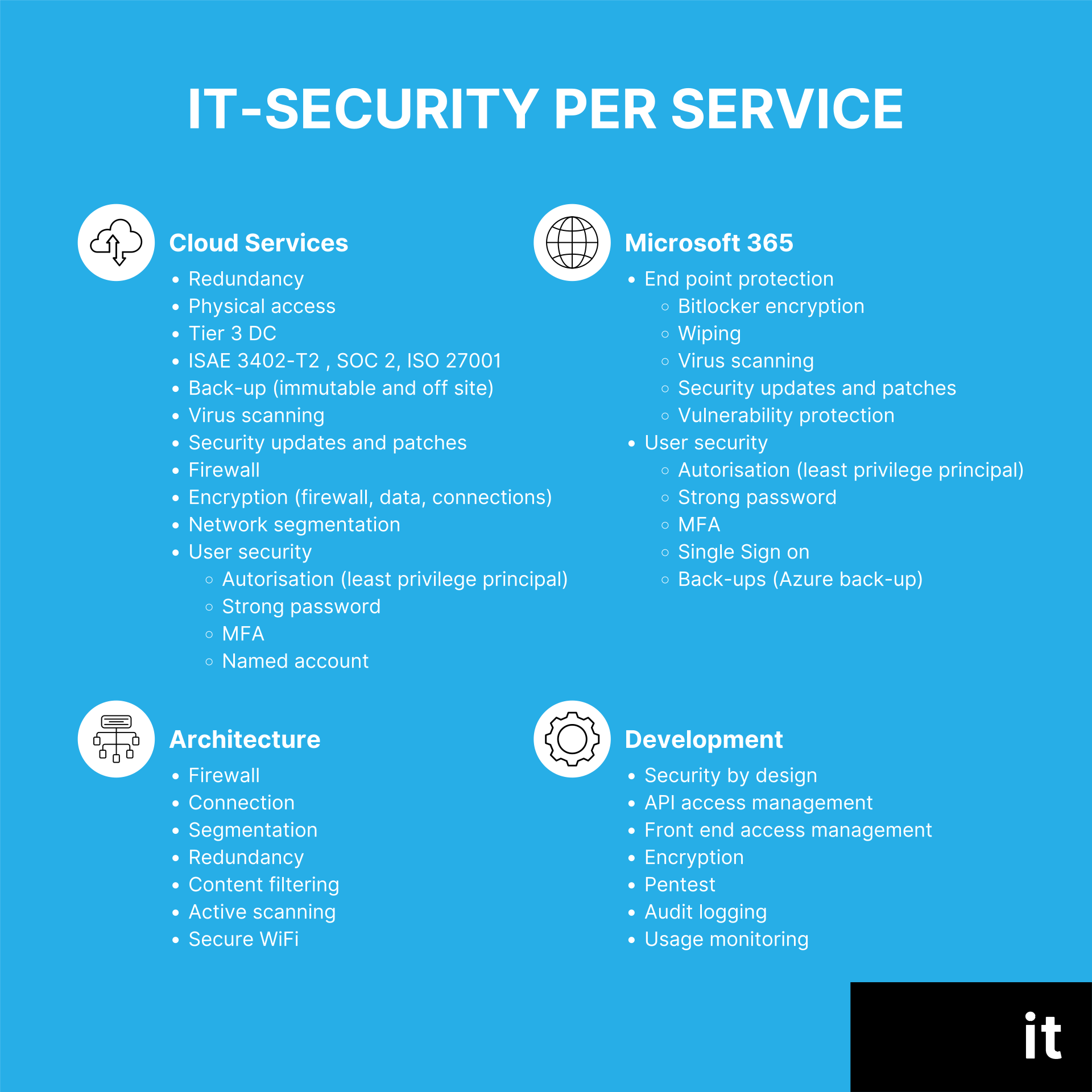
In the image below, you'll find a somewhat more technical overview of what Referit is already currently doing around IT security by service.
pentesting.
At Referit it is also possible to have pen testing done. We have this done by an independent party. A customer gets a good picture of the IT security within Referit. Everything we host in our environment can be checked, such as hardware, data and applications. Any vulnerabilities can then be reported.
always safe.
It's not about quick IT solutions, but short- and long-term security. We make sure in our cloud services that crucial systems are continuously monitored and checked, so that safe working becomes the most normal thing in the world.
Do you think Referit can help your company in this regard? Then leave your details now, completely secure, on our contact form 😉.